

If you have bought or received a subscription and are looking for how to redeem a Tinder code, the process is quick as long as you know where to enter it and which account to log in with.
Tinder codes allow you to activate Tinder Gold or Tinder Plus for a specific period. Once the code has been redeemed, the subscription is automatically added to your account and you can start using the premium features immediately.
In this VidaPlayer guide, you will find the exact process to redeem the code correctly, check that the subscription has been activated and avoid problems during the process.
What type of Tinder code can you redeem?
Before entering the code, it is worth knowing what type of subscription you are activating. Tinder codes are usually used to unlock Tinder gift cards for a specific period.
Code for Tinder Gold
A Tinder Gold code activates the platform’s most complete premium subscription.
With Tinder Gold, you can see who has liked your profile before swiping, use unlimited Likes, access monthly Boosts and use features such as Passport to change your location.
When the code is redeemed correctly, these features are automatically activated on your account.
Code for Tinder Plus
Tinder Plus codes activate a more basic premium version.
They include benefits such as unlimited Likes, the ability to undo your last swipe and the use of Passport to explore profiles in other locations.
Although it has fewer features than Gold, it still unlocks several useful tools within the app.
How to redeem a Tinder code step by step
The process to redeem a Tinder code is simple if you follow this order.
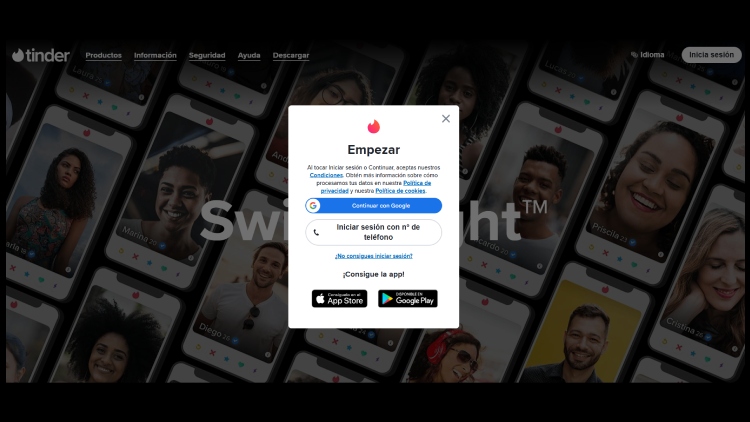
- Log in with your Tinder account. You can do this using your phone number, Google account or Apple account, depending on how your access is set up.
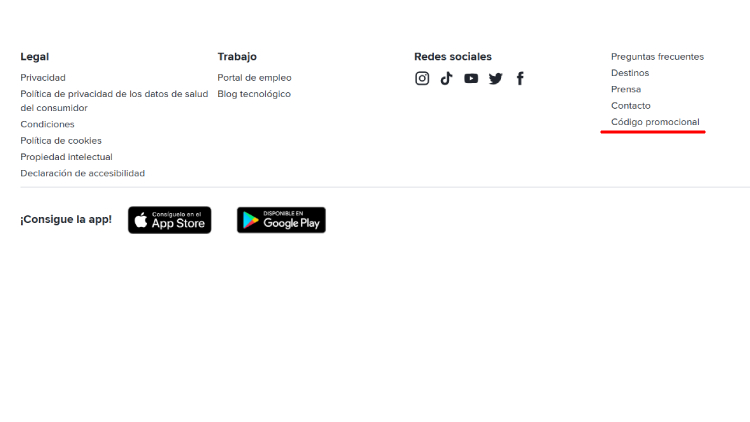
- Once inside, scroll down to the footer and click on promotional code.
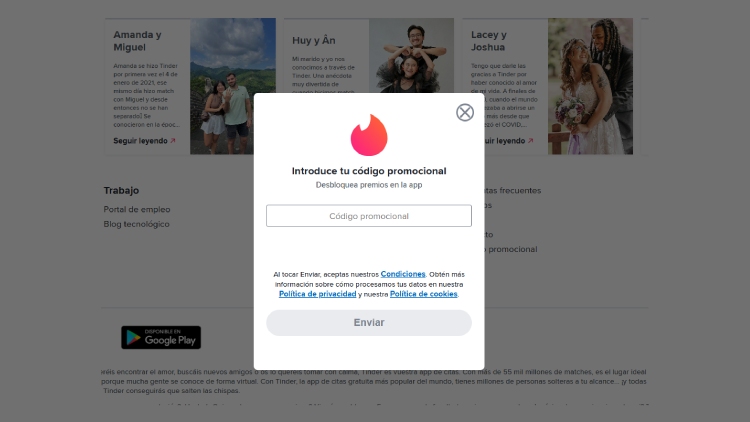
- Enter the code exactly as it appears. If you received it by email, it is best to copy and paste it to avoid mistakes.
- Confirm and wait for the activation message. If the code is valid, your Tinder Gold or Tinder Plus subscription will be activated automatically.
How to check that Tinder Gold or Tinder Plus has been activated correctly
After redeeming the code, you can check whether the subscription has been activated by reviewing your profile inside the app.
In the settings or subscriptions section, it should show that your account has the corresponding subscription active.
You will also notice a change in the app interface, as the premium features associated with the plan will be unlocked.
Problems when redeeming a Tinder code
The code does not work
One of the most common errors is entering the code incorrectly. A mistyped character or an extra space can cause the system to reject it.
Check the code carefully or copy and paste it directly from the email where you received it.
Code already used
Most Tinder codes can only be redeemed once. If a message appears saying that it has already been used, it means that the code was already activated on another account.
In that case, it cannot be used again.
Wrong account
The subscription is activated on the account that is logged in at the time of activation. If you use several accounts or have logged in with a different profile than usual, the subscription may have been activated on that profile instead of the one you wanted.
Frequently asked questions about redeeming Tinder codes
Can you redeem a Tinder code from mobile?
Yes. You can redeem it from your mobile browser or from the link included with the code, as long as you are logged in with your account.
How long does it take for Tinder Gold or Tinder Plus to activate?
Activation is immediate. As soon as you confirm the code, the premium features should appear available on your account.
Can the same code be used twice?
No. Tinder codes are usually single-use and are linked to the account where they are redeemed.
What should I do if the code shows an error?
First, check that you have entered it correctly and that you are using the correct redemption page or link. If the problem continues, it is best to contact the support service of the code provider.