
If you want to know how to redeem an Amazon gift card, in this VidaPlayer guide you will find the exact process to do it from the website or the official app in a simple way.
On Amazon, there is no separate activation process. When people talk about activating a gift card, they are actually referring to redeeming it inside the account. You do not need any external activator or previous steps: just enter the code in the corresponding section and that’s it, the amount is automatically added to your available balance.
How to redeem an Amazon gift card from the website
To redeem an Amazon gift card from a browser:
- Go to the official Amazon website for your country and log in with your account.
- Go to your account section and look for “gift cards” and the option to “redeem a gift card”.
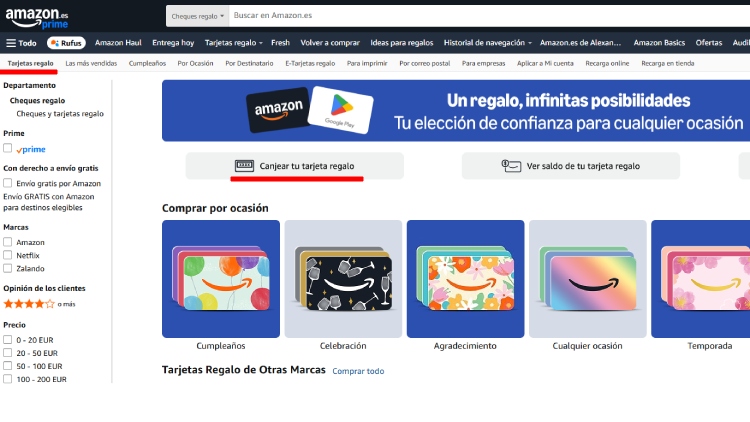
Enter the full code in the indicated field. You can copy and paste it if you received it by email, or type it manually if it is a physical card. Make sure you enter it exactly as it appears and do not add any extra spaces.
Finally, confirm the operation by clicking redeem. If everything is correct, the amount will be automatically added to your account balance and you will be able to use it on your next Amazon purchase.
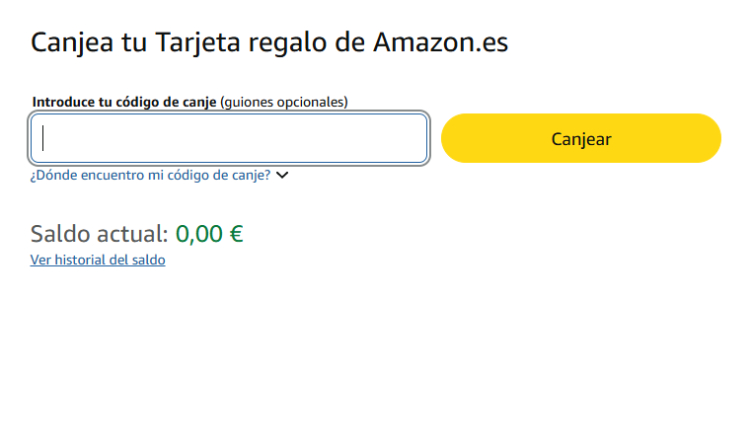
How to redeem an Amazon gift card from the app
- Open the app and log in with your account.
- Go to your account menu and enter the section related to gift cards or account balance.
- Look for the option to redeem a gift card.
- Enter the code manually or, if the app allows it, use the scanning function to read the code directly from the physical card.
- Confirm the operation and the balance will be added to your account immediately.
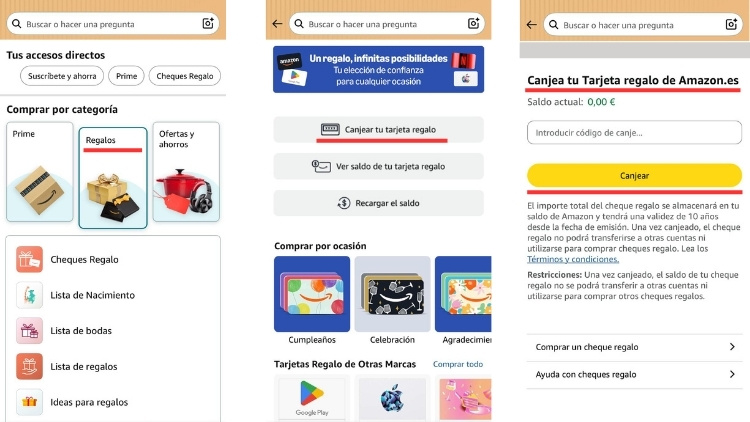
How to check that the balance has been added correctly
Once the process is complete, check the available balance in your account.
- Go to your Amazon profile and enter the gift card balance section. There you will see the available amount and the transaction history related to gift cards.
- If the amount appears in that section, it means the code has been redeemed correctly and the balance is now available to use on future Amazon purchases.