
Activating a Spotify gift card is much easier than it seems. In just a minute, you can go from having a free account to enjoying ad-free music, offline listening and unlimited skips, without needing to add a bank card.
If you bought your code from a reliable store like VidaPlayer, where you can get Spotify gift cards with instant delivery, you will usually have the code ready to use as soon as you complete your purchase.
Here you have the process explained clearly and directly so you can redeem your card correctly, know where to do it and avoid the most common mistakes, so it works the first time.
What you need before redeeming your Spotify code
Before activating your Spotify gift card, there are a few basic points worth checking. They are quick details, but they can make the difference between activating it the first time or running into unnecessary errors.
- An active Spotify account
It may sound obvious, but the code can only be redeemed within an account. If you do not have one yet, you can create it in a few seconds. - A valid and unused code
Each card can only be redeemed once. If the code has already been used or is entered incorrectly, it will not work. - The correct region
This is one of the most common issues. Your Spotify account and the card must be from the same country or region. If they do not match, the system will not allow you to activate it. - No incompatible active subscription
Some subscriptions, such as certain promotional plans or third-party plans, may prevent redemption. In those cases, you first need to wait for your current plan to end.
Checking these points saves you time and helps you avoid the most common errors when activating your code.
How to activate a Spotify gift card step by step
The process is quick and straightforward, but it is worth following these steps in order to avoid mistakes:
1. Go to the official redemption page
Go to Spotify’s official page to redeem your code: https://www.spotify.com/redeem
It is important to always do this from the official website to avoid problems or unsafe pages.
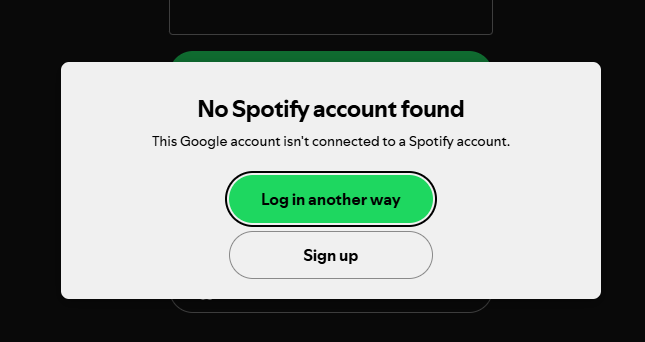
2. Log in to your account
Log in with your username and password. Make sure you are entering the correct account, as the code will be linked directly to it.
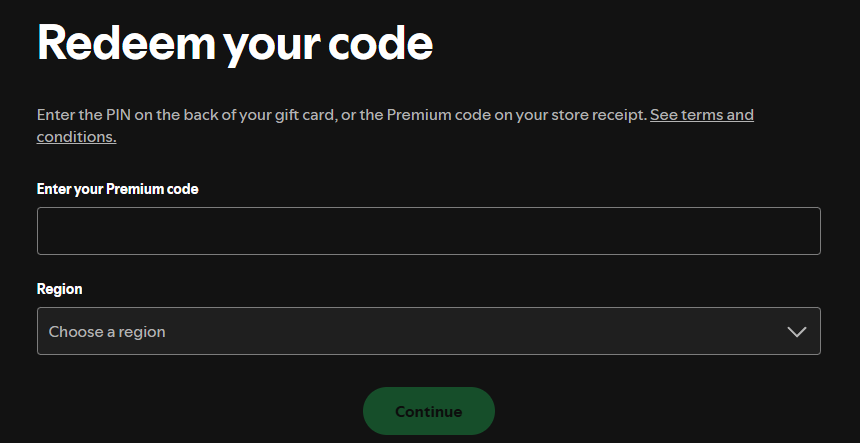
3. Enter the card code
Type the code exactly as it appears or, even better, copy and paste it to avoid mistakes. A single incorrect character will make it fail.
4. Confirm the activation
Once you have entered the code, confirm the redemption. If everything is correct, Spotify will automatically apply the balance or subscription.
5. Check that your account is Premium
Go to your profile and check your plan. You should see that Spotify Premium is now active and ready to use.
⚠️ Activating your code from the Spotify app
If you are using the app, it is normal to look for the option to redeem your card directly there. However, the process is not completed inside the app.
When you try to activate a gift card, Spotify automatically redirects you to the browser to complete the redemption on its official page. It is the same process you have seen above.
Problems activating a Spotify card and how to fix them
Although the process is simple, there are some fairly common errors. Here are the most frequent ones and how to fix them quickly:
The code does not work
Check that it has been entered correctly. If possible, copy and paste it. If it still fails, it may have already been used or may not be valid.
Region issue
The Spotify gift card must match the country of your account. If it does not, you will not be able to activate it.
Incompatible active subscription
Some active plans prevent redemption. You will need to wait for them to end before using the card.
Error on the redemption page
Try another browser, clear your cache or log in again. It is usually a temporary issue.
Tips before buying a Spotify gift card
Before buying a gift card, there are a few details you should be clear about. They are simple, but they help avoid problems and make sure everything works correctly from the start.
Check the region
Make sure the card belongs to the same country as your Spotify account. This is the most common mistake.
Buy from reliable stores
Use platforms such as VidaPlayer, where you receive the code instantly and know that it is official.
Avoid suspicious prices
If the price is too low, there may be a risk of invalid or already used codes.
Check the type of card
Check the duration, such as 1 month, 3 months, and so on, and make sure it fits what you need.
Frequently asked questions about Spotify gift cards
Can I use a Spotify gift card if I already have Premium?
It depends on the type of subscription you have. If you are on a standard individual plan, you can usually redeem it without problems. However, some active subscriptions, such as those contracted through third parties, may prevent the use of gift cards until they end.
What happens if I enter the code incorrectly several times?
If you enter the code incorrectly several times, Spotify may temporarily block the redemption attempt for security reasons. In that case, the best thing to do is wait a few minutes and try again, making sure you copy and paste the code correctly.
Can a gift card be used on another account?
No. Once the code is redeemed, it is linked to the account where it was activated. It cannot be transferred or reused on another account.
How long does Spotify Premium take to activate after redemption?
Activation is immediate. As soon as you confirm the code, your account becomes Premium and you can start using all the features without waiting.
Can I pay for Spotify Premium without a bank card?
Yes. Gift cards are one of the easiest ways to do it, as they allow you to activate Premium without adding any payment method or sharing bank details.
What does Spotify Premium include when activating the card?
When you activate the card, you get access to all Premium benefits: ad-free music, downloads for offline listening, unlimited skips and better audio quality.
How long does a Spotify gift card last?
It depends on the type of card you buy, such as 1 month, 3 months, and so on. The time starts counting from the moment the code is redeemed, not from the purchase date.
What are the advantages of using a Spotify gift card?
They allow you to control your spending, do not require a bank card and are a very convenient option both for personal use and as a gift.