
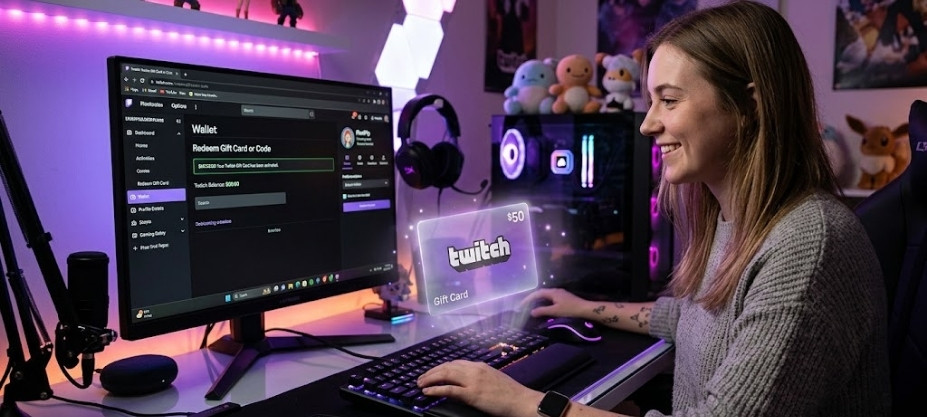
If you have bought a Twitch gift card and you are not sure what to do with the code, don’t worry: the process is quite straightforward, but there is one important detail many people overlook. When you redeem it, nothing is activated automatically; the amount is added as balance to your account.
When buying from platforms such as VidaPlayer, where you can find Twitch gift cards ready to use instantly, all you need to do is enter the code correctly and confirm the redemption.
In this guide, everything is explained clearly and practically: from how to activate the card step by step to what you can do afterwards with that balance and which mistakes you should avoid so everything works smoothly.
What you need before redeeming a Twitch gift card
Before entering the code, there are a couple of things you should be clear about. They are simple details, but on Twitch they make a difference.
- Have an active Twitch account
The balance will be added directly to your account, so make sure you can log in without any issues. - Use the correct account
Once redeemed, the balance cannot be transferred. If you have several accounts, check carefully which one you are using before continuing. - A valid and unused code
Each card can only be redeemed once. If the code has already been used or is entered incorrectly, it will not work. - Understand what you are actually activating
Redeeming the card does not automatically activate any subscription. The amount is added as balance to use within Twitch.
Once these points are clear, the activation process is quick and simple.
How to activate a Twitch gift card step by step
The process is quick and is completed directly from the official Twitch page. If you follow these steps, your balance will be available in your account in less than a minute.
1. Go to the official redeem page
Go to 👉 https://www.twitch.tv/redeem and always make sure you are using the official website.
2. Log in to your account
Log in with your username and password. Check that you are using the correct account, as the balance will be added directly there.
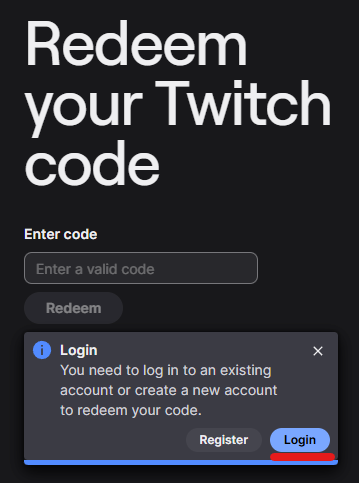
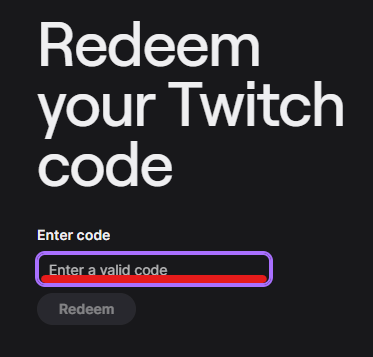
3. Enter the card code
Copy and paste the code to avoid mistakes. If you type it manually, check every character carefully.
4. Confirm the redemption
Once entered, confirm the activation. If everything is correct, Twitch will add the balance automatically.
5. Check that the balance has been added
Go to your account and check that the amount is now available to use within Twitch.
👉 This is where many people get confused: no subscription is activated automatically; the money stays as balance in your account.
⚠️ What happens when you redeem a Twitch gift card
When you activate your code, no subscription starts automatically. The amount is added as balance to your Twitch account.
That balance remains available so you can use it whenever you want within the platform.
You can use it to subscribe to channels, buy bits or directly support your favourite creators.
How to do it from your Twitch profile
- Log in to the account where you want to add the balance
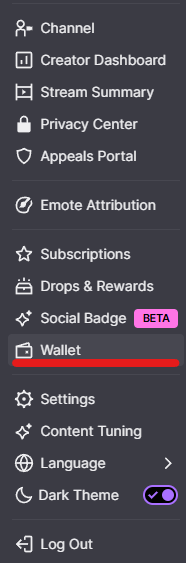
- Click on your profile picture, in the top-right corner
- Go to the Wallet section
- Inside Wallet, select the option to redeem gift card
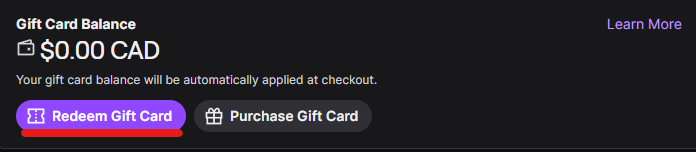
From here, the process is the same: enter the code, confirm it and the balance will be added automatically to your account.
What you can use Twitch balance for
Once you have redeemed the card, the amount remains as balance in your account. From there, you can use it within Twitch in several ways.
- Subscribe to channels
You can support your favourite streamers by subscribing to their channels. This is one of the most common ways to use the balance. - Buy bits
Bits are used to send cheers during live streams and support content creators directly. - Support creators on the platform
The balance allows you to participate more actively in the community, either through subscriptions or interactions within streams.
This balance does not expire immediately, so you can use it whenever you want depending on how you interact with Twitch.
Problems activating a Twitch gift card and how to avoid them
Before assuming that the code does not work, it is worth checking a few common points. Most errors have a quick solution or can be easily avoided.
The code does not work
Check that it has been entered correctly. If possible, copy and paste it to avoid mistakes.
The code has already been used
Each code can only be redeemed once. If this error appears, it has already been used.
You are using the wrong account
Make sure you are logged into the correct account before redeeming the code.
Region issues
The card must match the country of your account. Otherwise, it may not work.
The page does not load or shows an error
Try another browser, clear your cache or log in again. It is usually a temporary issue.
Buy from reliable sites
Avoid problems by buying from platforms such as VidaPlayer, where codes are official and delivered instantly.
Frequently asked questions about Twitch gift cards
Does a Twitch gift card automatically activate a subscription?
No. When you redeem the card, the amount is added as balance to your account. You can then use that balance to subscribe to the channel you want.
Where can I see my Twitch account balance?
You can see it in the Wallet section of your profile. The available balance will appear there once you have redeemed the card.
Can Twitch balance be used on any channel?
Yes. You can use it to subscribe to any channel or to buy bits within the platform.
Do Twitch gift cards expire?
It depends on the card’s conditions, but in most cases they do not expire immediately. Even so, it is recommended to redeem it as soon as possible.
Can a Twitch gift card be redeemed from a mobile phone?
Yes. You can do it from your mobile browser or by accessing your account, always following the same redemption process.
What happens if I enter the code incorrectly?
If you enter the code incorrectly, Twitch will not validate it. The best option is to copy and paste it to avoid mistakes.