
Activating a Discord code is a quick process, but it is not always as intuitive as it seems. Depending on your account and whether you already have an active subscription, the result may vary, and that is where doubts usually appear.
If you bought your code from a reliable store like VidaPlayer, where you can find different digital gift cards with instant delivery, you will usually have it ready to use in just a few seconds.
Here you have the process explained clearly so you can redeem your code without errors, understand what happens when you activate it and avoid the most common problems from the very beginning.
What you need before redeeming a Discord code
Before activating your code, it is worth checking a few basic points. They are quick details, but on Discord they have a big impact on whether the redemption works correctly or not.
- Have an active Discord account
The code is linked directly to your account, so make sure you have access and can log in without any issues. - Use the correct account
It sounds obvious, but it is one of the most common mistakes. If you have several accounts, check carefully which one you are using before redeeming the code. - A valid and unused code
Each code can only be redeemed once. If it has already been used or is not valid, you will not be able to activate it. - Know whether you already have Discord Nitro active
This point is key. If you already have an active subscription, the code may not always be applied directly and may instead be converted into credit.
Having these points clear from the start will help you avoid most problems when activating your code.
How to activate a Discord code step by step
The process is simple, but it is important to do it inside Discord and in the correct order to avoid errors:
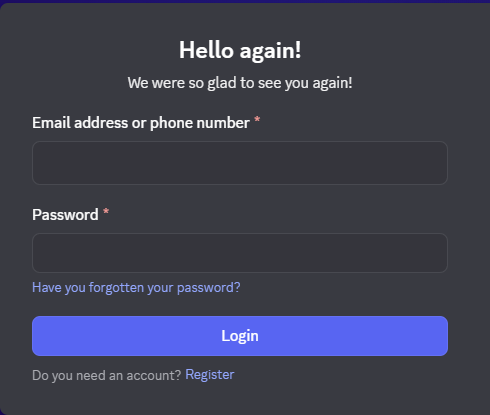
1. Open Discord and log in
Access your account from the app or browser. Make sure you are using the account where you want to activate the code. You can do it directly from https://discord.com/login
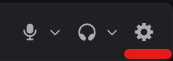
2. Go to “Gift Inventory”
Inside User Settings, located in the bottom-right area, look for the Gift Inventory section. This is where Discord manages codes and gifts.
3. Click “Redeem Codes”
Inside this section, you will see the option to enter your code manually.
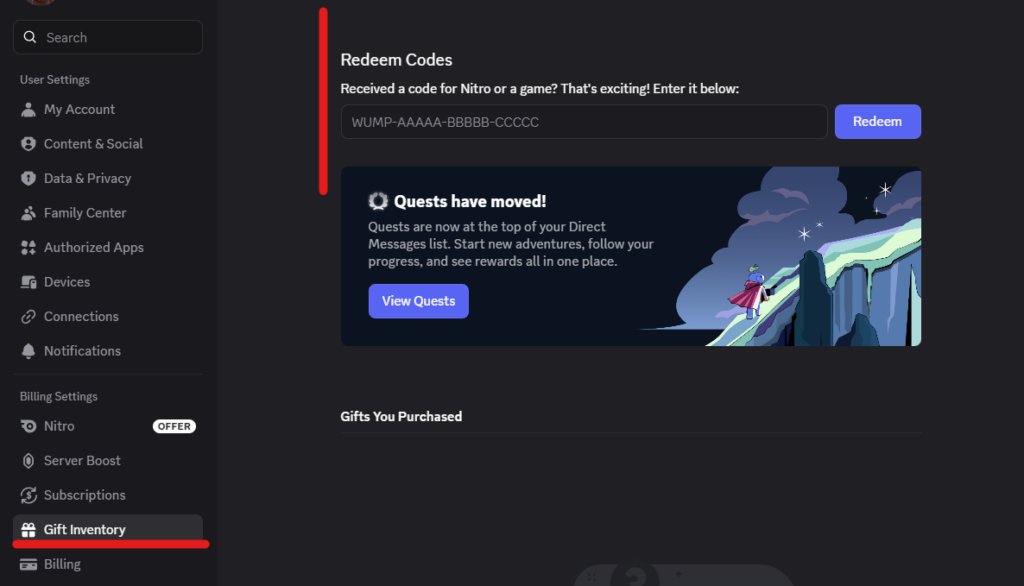
4. Enter your 19-character code
Copy and paste the code to avoid mistakes. It is important to enter it exactly as you received it.
5. Confirm the redemption and check the result
Once confirmed, Discord will apply the code. At this point, two things can happen:
- It may activate directly, for example Discord Nitro
- Or it may be saved as credit in your account if you already have an active subscription
⚠️ What happens if you already have Discord Nitro active
If you already have an active subscription, the code may not always be applied directly. In many cases, Discord saves it as credit in your account instead of activating it at that moment.
This credit will only be used when your current subscription ends and only if the plan type matches, for example Nitro with Nitro.
In some cases, Discord may ask you to add a payment method to activate the credit, although you will not be charged until renewal if everything is correct.
Problems activating a Discord code and key tips before buying
Before assuming the code does not work, it is worth checking a few key points. Most problems have a quick solution or can be avoided from the start.
The code does not work
Check that it has been entered correctly. If possible, copy and paste it to avoid mistakes.
The code has already been used
Codes can only be used once. If this error appears, it has already been redeemed.
You are using the wrong account
Make sure you are logged into the account where you want to activate the code.
You already have Nitro active
In this case, the code may be saved as credit instead of being activated directly.
The credit is not applied
It only works if the plan type matches, for example Nitro with Nitro, monthly with monthly, and so on.
Discord asks for a payment method
This may be necessary to activate the credit, although you will not be charged immediately.
Buy from reliable sites
Avoid problems by buying from platforms such as VidaPlayer, where codes are official and delivered instantly.
Frequently asked questions about Discord codes
Can I use a Discord code if I already have Nitro active?
Yes, but it will not always be applied directly. In many cases, the code will be saved as credit in your account and used when your current subscription ends.
Why does my code not activate Discord Nitro immediately?
This usually happens when you already have an active subscription or when the code does not match the type of plan you have. In those cases, it is saved as credit instead of being activated directly.
Do I have to add a payment method to redeem the code?
In some cases, yes. Discord may ask for it to activate the credit or subscription, although you will not be charged until the period included in the code ends.
Can a Discord code be used from mobile?
Yes, you can start the process from mobile, but you will always need to complete the redemption inside Discord by accessing your account settings.
How do I know if a Discord code has already been used?
When you enter the code, Discord will tell you if it has already been redeemed. If that message appears, it means it cannot be used again.
Where do I redeem a Discord code?
It is redeemed inside Discord, in the Gift Inventory → Redeem Codes section within User Settings.